Settings
Settings is where you configure how your system works — integrations, AI memory, schedule, resource types, templates, and appearance. It uses a searchable sidebar interface so you can find any setting quickly.
Interface
Settings opens as a full page with a sidebar listing all sections. A search bar at the top filters sections by name, description, or keyword — type "theme" to jump to Appearance, or "google" to find Integrations. Click a section to open its configuration panel on the right.
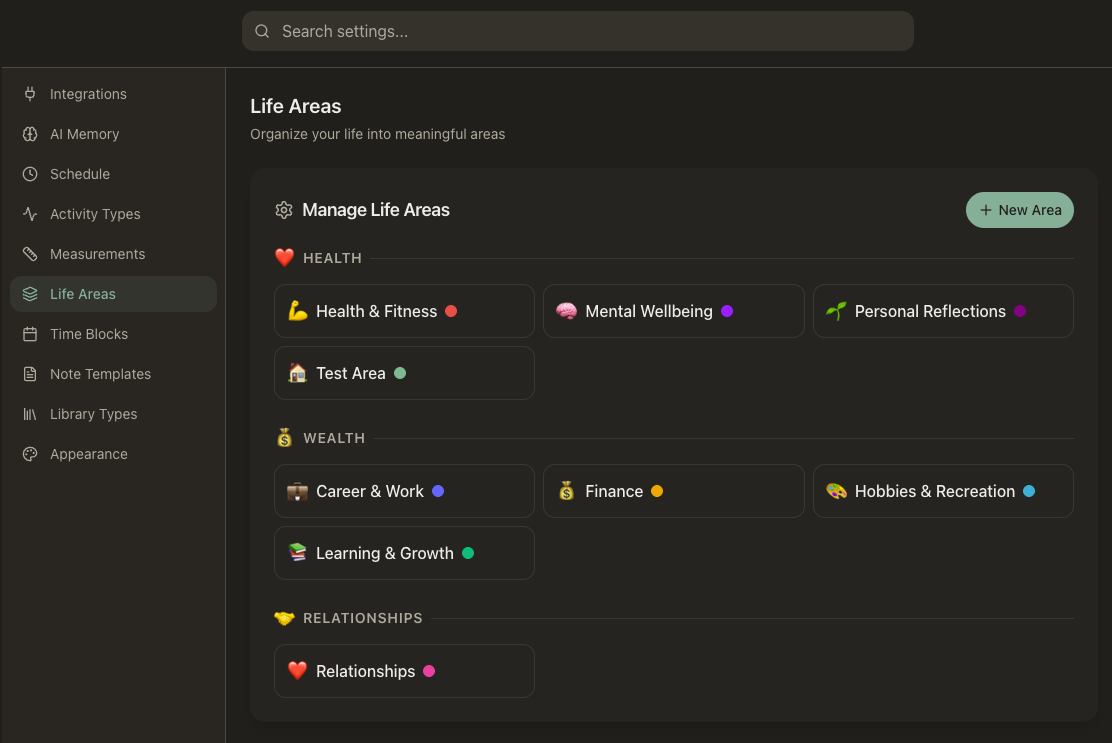
Sections
Connect external services — Google (Gmail, Calendar, Drive, Docs, Sheets, Contacts), Notion, and Apple Calendar. Manage connected accounts, view sync status, rename or disconnect accounts, and set defaults. OAuth flows happen right from this panel.
AI Memory
View, search, edit, and delete everything your AI has learned about you. Memories are facts, preferences, and patterns the AI has picked up from your conversations and data. Remove anything you don't want remembered, or edit a memory to correct it.
Schedule
Configure your day boundaries — when your day starts (wake time) and ends (bedtime). Toggle whether sleep hours are hidden in the Day View to keep the timeline focused on your active hours.
Create and manage your activity types — Reading, Running, Coding, Meditating, or anything you track. Each type has its own icon, color, and tracking mode (duration, quantity, or occurrence).
Define what you measure and how — weight, sleep hours, spending, mood score, or any quantifiable aspect of your life. Set units, value types, and display preferences for each measurement.
Manage the top-level pillars of your life — Health, Career, Finance, Relationships, and any others. Set icons, colors, and ordering. Every other resource organizes under an area.
Create routine time block templates that define your recurring daily structure — morning routines, focus sessions, exercise blocks. Templates auto-populate your Day View.
Note Templates
Build reusable templates for notes — weekly reviews, meeting agendas, project kickoffs, daily journals. Assign templates to periods so they appear automatically at the right cadence.
Define entity types for your lists — books, movies, courses, people, or anything else. Each type gets its own schema with custom fields, icon, color, and display settings.
Appearance
Choose your theme — Light, Dark, or System (follows your OS preference). Toggle Reduce Motion to minimize animations throughout the interface.
Theme Options
Light
Clean, bright interface
Dark
Easy on the eyes, day and night
System
Follows your OS preference
Your system, your way
Settings define the shape of your workspace — what you track, how your day is structured, which services are connected, and what your AI remembers. Everything here is about making the system fit how you actually live and work.